
Install the app
How to install the app on iOS
Follow along with the video below to see how to install our site as a web app on your home screen.
Note: This feature may not be available in some browsers.
You are using an out of date browser. It may not display this or other websites correctly.
You should upgrade or use an alternative browser.
You should upgrade or use an alternative browser.
Ultimate BB Coding Guide!
- Thread starter _MooCow
- Start date
DaddysLittleBrat
New Member
Hi! [\size][\color]
VanityPixie said:Hi![\u][\size][\color]
Change the "\" to a /
DaddysLittleBrat
New Member
Rose said:VanityPixie said:Hi![\u][\size][\color]
Change the "\" to a /
thaaanks. Lololols
Jerk123123
Well-Known Member
Valentine’s Day Hunt
As most of you know, there is a hunt going on until February 25th at 12pm PDT which offers some awesome prizes.
Here is a link to ATA's thread announcing the hunt.
Thread Outline:[/center]
- Item Dropping
- Rewards
- 100 Luv Txts Time Chart
- 300 Luv Txts Time Chart
- 600 Luv Txts Time Chart
- 1000 Luv Txts Time Chart
- 1500 Luv Txts Time Chart
- 2000 Luv Txts Time Chart
- 3000 Luv Txts Time Chart
- 4000 Luv Txts Time Chart
- 7000 Luv Txts Time Chart
- 10000 Luv Txts Time Chart
Item Dropping
For this hunt you need to collect Luv Txts.

These drop from all parties
Rewards
10000 Luv Txts:
Avatars (50%)
2 Hypnocats
1 Pizza Bikini
3 Doctor’s Notes
Gold Achievement Level 5
7000 Luv Txts:
Avatars (50%)
1 Pizza Bikini
2 Doctor’s Notes
Gold Achievement Level 4
4000 Luv Txts:
Avatars (45%)
1 Pizza Bikini
2 Doctor’s Notes
Gold Achievement Level 3
3000 Luv Txts:
Avatars (45%)
2 Doctor’s Notes
Gold Achievement Level 2
2000 Luv Txts:
Avatars (40%)
2 Doctor’s Notes
Gold Achievement Level 1
1500 Luv Txts:
Avatars (40%)
2 Doctor’s Notes
Achievement Level 5
1000 Luv Txts:
Avatars (21%)
Doctor’s Notes
Achievement Level 4
600 Luv Txts:
Avatars (21%)
1 Doctor’s Note
Achievement Level 3
300 Luv Txts:
Avatars (11%)
Achievement Level 2
100 Luv Txts:
Avatars (11%)
Achievement Level 1
Below are approximations of how many Luv Txts you should have by 12pm PDT on each of the following days if you want to get the rewards for that specific amount of items collected.
100 Luv Txts
February 13th: 8
February 14th: 15
February 15th: 23
February 16th: 30
February 17st: 38
February 18th: 45
February 19th: 53
February 20th: 60
February 21st: 68
February 22nd: 75
February 23rd: 83
February 24th: 90
February 25th: 100
300 Luv Txts
February 13th: 23
February 14th: 46
February 15th: 69
February 16th: 92
February 17st: 115
February 18th: 138
February 19th: 161
February 20th: 184
February 21st: 207
February 22nd: 230
February 23rd: 253
February 24th: 276
February 25th: 300
600 Luv Txts
February 13th: 46
February 14th: 92
February 15th: 138
February 16th: 184
February 17st: 230
February 18th: 276
February 19th: 322
February 20th: 368
February 21st: 414
February 22nd: 460
February 23rd: 506
February 24th: 552
February 25th: 600
1000 Luv Txts
February 13th: 77
February 14th: 154
February 15th: 231
February 16th: 308
February 17st: 385
February 18th: 462
February 19th: 539
February 20th: 616
February 21st: 693
February 22nd: 770
February 23rd: 847
February 24th: 924
February 25th: 1000
1500 Luv Txts
February 13th: 115
February 14th: 230
February 15th: 345
February 16th: 460
February 17st: 575
February 18th: 690
February 19th: 805
February 20th: 920
February 21st: 1035
February 22nd: 1150
February 23rd: 1265
February 24th: 1380
February 25th: 1500
2000 Luv Txts
February 13th: 154
February 14th: 308
February 15th: 462
February 16th: 616
February 17st: 770
February 18th: 924
February 19th: 1078
February 20th: 1232
February 21st: 1368
February 22nd: 1540
February 23rd: 1694
February 24th: 1848
February 25th: 2000
3000 Luv Txts
February 13th: 231
February 14th: 462
February 15th: 693
February 16th: 924
February 17st: 1155
February 18th: 1368
February 19th: 1617
February 20th: 1848
February 21st: 2079
February 22nd: 2310
February 23rd: 2541
February 24th: 2772
February 25th: 3000
4000 Luv Txts
February 13th: 308
February 14th: 616
February 15th: 924
February 16th: 1232
February 17st: 1540
February 18th: 1848
February 19th: 2156
February 20th: 2464
February 21st: 2772
February 22nd: 3080
February 23rd: 3388
February 24th: 3696
February 25th: 4000
7000 Luv Txts
February 13th: 538
February 14th: 1076
February 15th: 1614
February 16th: 2152
February 17st: 2690
February 18th: 3228
February 19th: 3766
February 20th: 4304
February 21st: 4842
February 22nd: 5380
February 23rd: 5918
February 24th: 6456
February 25th: 7000
10000 Luv Txts
February 13th: 769
February 14th: 1538
February 15th: 2307
February 16th: 3076
February 17st: 3845
February 18th: 4614
February 19th: 5383
February 20th: 6152
February 21st: 6921
February 22nd: 7690
February 23rd: 8459
February 24th: 9228
February 25th: 10000
↝❥Mͥɑgͣsͫ✾↜
Jerk123123
Well-Known Member
Valentine’s Day Hunt
As most of you know, there is a hunt going on until February 25th at 12pm PDT which offers some awesome prizes.
Here is a link to ATA's thread announcing the hunt.
Thread Outline:
- Item Dropping
- Rewards
- 100 Luv Txts Time Chart
- 300 Luv Txts Time Chart
- 600 Luv Txts Time Chart
- 1000 Luv Txts Time Chart
- 1500 Luv Txts Time Chart
- 2000 Luv Txts Time Chart
- 3000 Luv Txts Time Chart
- 4000 Luv Txts Time Chart
- 7000 Luv Txts Time Chart
- 10000 Luv Txts Time Chart
Item Dropping
For this hunt you need to collect Luv Txts.
These drop from all parties
Rewards
10000 Luv Txts:
Avatars (50%)
2 Hypnocats
1 Pizza Bikini
3 Doctor’s Notes
Gold Achievement Level 5
7000 Luv Txts:
Avatars (50%)
1 Pizza Bikini
2 Doctor’s Notes
Gold Achievement Level 4
4000 Luv Txts:
Avatars (45%)
1 Pizza Bikini
2 Doctor’s Notes
Gold Achievement Level 3
3000 Luv Txts:
Avatars (45%)
2 Doctor’s Notes
Gold Achievement Level 2
2000 Luv Txts:
Avatars (40%)
2 Doctor’s Notes
Gold Achievement Level 1
1500 Luv Txts:
Avatars (40%)
2 Doctor’s Notes
Achievement Level 5
1000 Luv Txts:
Avatars (21%)
Doctor’s Notes
Achievement Level 4
600 Luv Txts:
Avatars (21%)
1 Doctor’s Note
Achievement Level 3
300 Luv Txts:
Avatars (11%)
Achievement Level 2
100 Luv Txts:
Avatars (11%)
Achievement Level 1
Below are approximations of how many Luv Txts you should have by 12pm PDT on each of the following days if you want to get the rewards for that specific amount of items collected.
100 Luv Txts
February 13th: 8
February 14th: 15
February 15th: 23
February 16th: 30
February 17st: 38
February 18th: 45
February 19th: 53
February 20th: 60
February 21st: 68
February 22nd: 75
February 23rd: 83
February 24th: 90
February 25th: 100
300 Luv Txts
February 13th: 23
February 14th: 46
February 15th: 69
February 16th: 92
February 17st: 115
February 18th: 138
February 19th: 161
February 20th: 184
February 21st: 207
February 22nd: 230
February 23rd: 253
February 24th: 276
February 25th: 300
600 Luv Txts
February 13th: 46
February 14th: 92
February 15th: 138
February 16th: 184
February 17st: 230
February 18th: 276
February 19th: 322
February 20th: 368
February 21st: 414
February 22nd: 460
February 23rd: 506
February 24th: 552
February 25th: 600
1000 Luv Txts
February 13th: 77
February 14th: 154
February 15th: 231
February 16th: 308
February 17st: 385
February 18th: 462
February 19th: 539
February 20th: 616
February 21st: 693
February 22nd: 770
February 23rd: 847
February 24th: 924
February 25th: 1000
1500 Luv Txts
February 13th: 115
February 14th: 230
February 15th: 345
February 16th: 460
February 17st: 575
February 18th: 690
February 19th: 805
February 20th: 920
February 21st: 1035
February 22nd: 1150
February 23rd: 1265
February 24th: 1380
February 25th: 1500
2000 Luv Txts
February 13th: 154
February 14th: 308
February 15th: 462
February 16th: 616
February 17st: 770
February 18th: 924
February 19th: 1078
February 20th: 1232
February 21st: 1368
February 22nd: 1540
February 23rd: 1694
February 24th: 1848
February 25th: 2000
3000 Luv Txts
February 13th: 231
February 14th: 462
February 15th: 693
February 16th: 924
February 17st: 1155
February 18th: 1368
February 19th: 1617
February 20th: 1848
February 21st: 2079
February 22nd: 2310
February 23rd: 2541
February 24th: 2772
February 25th: 3000
4000 Luv Txts
February 13th: 308
February 14th: 616
February 15th: 924
February 16th: 1232
February 17st: 1540
February 18th: 1848
February 19th: 2156
February 20th: 2464
February 21st: 2772
February 22nd: 3080
February 23rd: 3388
February 24th: 3696
February 25th: 4000
7000 Luv Txts
February 13th: 538
February 14th: 1076
February 15th: 1614
February 16th: 2152
February 17st: 2690
February 18th: 3228
February 19th: 3766
February 20th: 4304
February 21st: 4842
February 22nd: 5380
February 23rd: 5918
February 24th: 6456
February 25th: 7000
10000 Luv Txts
February 13th: 769
February 14th: 1538
February 15th: 2307
February 16th: 3076
February 17st: 3845
February 18th: 4614
February 19th: 5383
February 20th: 6152
February 21st: 6921
February 22nd: 7690
February 23rd: 8459
February 24th: 9228
February 25th: 10000
↝❥Mͥɑgͣsͫ✾↜
Hermes-IN-DaClouds
Member
Factions
Finally! Our patience has paid off and SMASH has released Factions!
With the Recent release of factions there have been plenty of questions about:
How to Join and Leave
If you look at the very bottom of the screen, right to the right of Create Monsters you will see a tab that says Faction .
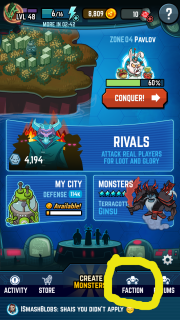
When you click it, you should get a screen that looks like this:
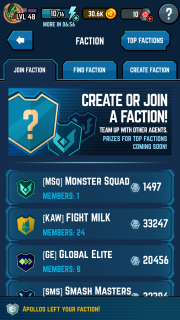
There you have 3 tabs:
In the join faction tab you can scroll and find recently made factions.
In the find faction screen which looks like this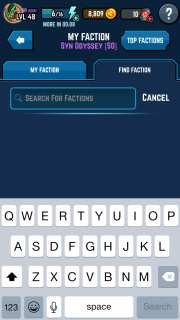
you can type in a faction
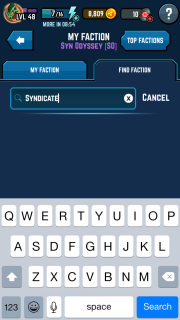
and search it
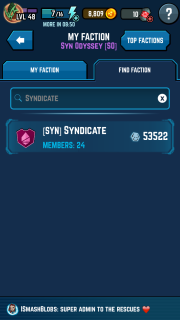
When you find the faction you are looking for, then tap it and you will get a screen that looks like this:

Just tap apply, and wait and pray to be accepted!
When you want to leave, tap the faction tab and see a screen like this:
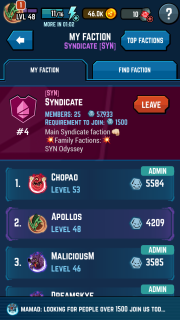
Right next to the right of the name of the faction there is a button that say Leave. Tap that and you will leave the faction.
How to Start
So, you think you are special and strong enough to start your very own faction! It definitely is a fun undertaking, but it also requires a lot of hard work. In order to run a successful faction, you have to stay active, help out your faction-mates, make sure you don't make other factions mad at you, boot troublemakers and inactive players, and so much more!
A faction costs 50 Element X.
In order to start a faction you cannot be a member of a faction. Tap your faction tab and you will see a screen like this:
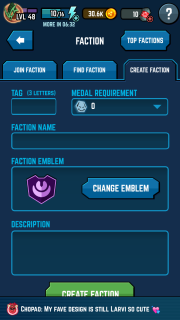
You will have to fill out a tag which can only be three letters, a medal requirement (please be reasonable, especially if you are stsrting a new clan), a unique faction name, an emblem, and a description.
Once you are satisfied with everything click Create Faction and wala! You are now the owner of a brand new faction!
Now, since you are an owner of a new faction, you now need to know…
How to Manage
I am not going to get into all the politics of faction alliances or anything. I am just going to show you how to accept members and change rolls.
As the owner ofr the admin of a faction, one of your key responsibilities is to accept new members. This is not a difficult process, but I will show you how it is done.
As you are playing you may randomly see a notification on your faction tab.
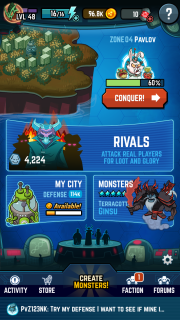
This means that someone may be trying to join. When you tap the faction tab you will see a screen with your members, as well as some players who are “pending.”
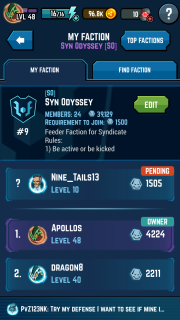
When you tap the “pending” player you will get a screen along with their profile that says “Accept” or “Reject.” Their future is now in your hands!
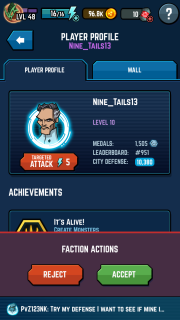
There are three different rolls in a faction:
Members
Members have the most basic roles in a faction. They represent the faction in world chat, encourage the other players, and need to be loyal to the admins and owner.
Administrators
Admins act as the arms of the owner. Their responsibilities include, but are not limited to, helping the members of the faction with gameplay, represent the faction properly, accept new members, kick inactive or bad members, etc.
Owner
The Owner is the face of the faction. They are responsible for all decisions made, have the final call regarding members and decisions, can change the rolls of admins and members, represent the faction, disband the faction, etc.
Changing Rolls/Kicking
To change the rolls of a player, tap the faction tab and scroll down to find the player you wish to promote, demote, or kick.
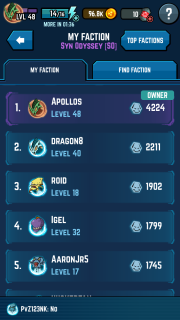
Once you tap the name, a pop up screen will appear along with the profile.
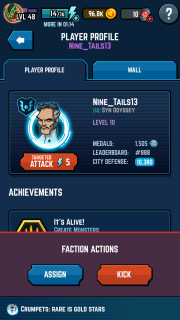
The assign button will help you change the rolls of the members while the kick button will kick members out of the faction.
Hope this helps you with the new release of factions!
Finally! Our patience has paid off and SMASH has released Factions!
With the Recent release of factions there have been plenty of questions about:
- How to Join and Leave
- How to Start
- How to Manage
How to Join and Leave
If you look at the very bottom of the screen, right to the right of Create Monsters you will see a tab that says Faction .

When you click it, you should get a screen that looks like this:

There you have 3 tabs:
- Join Faction
- Find Faction
- Create Faction
In the join faction tab you can scroll and find recently made factions.
In the find faction screen which looks like this

you can type in a faction

and search it

When you find the faction you are looking for, then tap it and you will get a screen that looks like this:

Just tap apply, and wait and pray to be accepted!
When you want to leave, tap the faction tab and see a screen like this:

Right next to the right of the name of the faction there is a button that say Leave. Tap that and you will leave the faction.
How to Start
So, you think you are special and strong enough to start your very own faction! It definitely is a fun undertaking, but it also requires a lot of hard work. In order to run a successful faction, you have to stay active, help out your faction-mates, make sure you don't make other factions mad at you, boot troublemakers and inactive players, and so much more!
A faction costs 50 Element X.
In order to start a faction you cannot be a member of a faction. Tap your faction tab and you will see a screen like this:

You will have to fill out a tag which can only be three letters, a medal requirement (please be reasonable, especially if you are stsrting a new clan), a unique faction name, an emblem, and a description.
Once you are satisfied with everything click Create Faction and wala! You are now the owner of a brand new faction!
Now, since you are an owner of a new faction, you now need to know…
How to Manage
I am not going to get into all the politics of faction alliances or anything. I am just going to show you how to accept members and change rolls.
As the owner ofr the admin of a faction, one of your key responsibilities is to accept new members. This is not a difficult process, but I will show you how it is done.
As you are playing you may randomly see a notification on your faction tab.

This means that someone may be trying to join. When you tap the faction tab you will see a screen with your members, as well as some players who are “pending.”

When you tap the “pending” player you will get a screen along with their profile that says “Accept” or “Reject.” Their future is now in your hands!

There are three different rolls in a faction:
- Members
- Admins
- Owner
Members
Members have the most basic roles in a faction. They represent the faction in world chat, encourage the other players, and need to be loyal to the admins and owner.
Administrators
Admins act as the arms of the owner. Their responsibilities include, but are not limited to, helping the members of the faction with gameplay, represent the faction properly, accept new members, kick inactive or bad members, etc.
Owner
The Owner is the face of the faction. They are responsible for all decisions made, have the final call regarding members and decisions, can change the rolls of admins and members, represent the faction, disband the faction, etc.
Changing Rolls/Kicking
To change the rolls of a player, tap the faction tab and scroll down to find the player you wish to promote, demote, or kick.

Once you tap the name, a pop up screen will appear along with the profile.

The assign button will help you change the rolls of the members while the kick button will kick members out of the faction.
Hope this helps you with the new release of factions!
Jerk123123
Well-Known Member
?Love Your Pets Day
It isn't February 20th quite yet, at least not where I live, but I think it's close enough. Today, February 20th is Love Your Pets Day, you can check online if you don't believe me. I thought this day should be celebrated because I for one adore my pet. My pet is a giant schnauzer and she is the cutest thing in the world.
In honor of this fun and loving day I thought it would be nice if everyone shared a thing or two, a memory, a quality, a picture that conveys why they love their pets so much and how these wonderful creatures make your day to day lives better.
The two pictures that I have included are of my lovely little baby.
️↝❥мͥɑgͣsͫ✾↜️
renamed2600
New Member
Maaaaaags. The pink is too light
Jerk123123
Well-Known Member
?Love Your Pets Day
It isn't February 20th quite yet, at least not where I live, but I think it's close enough. Today, February 20th is Love Your Pets Day, you can check online if you don't believe me. I thought this day should be celebrated because I for one adore my pet. My pet is a giant schnauzer and she is the cutest thing in the world.
In honor of this fun and loving day I thought it would be nice if everyone shared a thing or two, a memory, a quality, a picture that conveys why they love their pets so much and how these wonderful creatures make your day to day lives better.
The two pictures that I have included are of my lovely little baby.
️↝❥мͥɑgͣsͫ✾↜️
renamed2600
New Member
That pink-ish color is prettttyyyy
Jerk123123
Well-Known Member
?Love Your Pets Day
It isn't February 20th quite yet, at least not where I live, but I think it's close enough. Today, February 20th is Love Your Pets Day, you can check online if you don't believe me. I thought this day should be celebrated because I for one adore my pet. My pet is a giant schnauzer and she is the cutest thing in the world.
In honor of this fun and loving day I thought it would be nice if everyone shared a thing or two, a memory, a quality, a picture that conveys why they love their pets so much and how these wonderful creatures make your day to day lives better.
The two pictures that I have included are of my lovely little baby.
️↝❥мͥɑgͣsͫ✾↜️
-_A_-CareBearCrystal
Well-Known Member
Sticky-COS_JiggyFarmsNazzy- said:
A Guide To The Right Avatar
Avatars